Professional Email Setup & Migration on the Gold Coast
Email communication forms the absolute cornerstone of modern business operations and personal connectivity, yet proper setup and migration remain amongst the most technically challenging and potentially disruptive processes faced by Gold Coast residents and businesses. At Bcom, we understand that your email system must function flawlessly from the very moment you need it. That is why we provide comprehensive email setup and migration services designed to ensure seamless transitions, preserve every piece of your important correspondence, and completely eliminate the technical complexities that often accompany system changes.
Our expert email setup and migration services encompass everything from simple account configuration for home users to complex enterprise email system migrations for growing companies. We cover all major platforms including Microsoft Outlook, Gmail, Telstra Bigpond, and numerous other providers. Whether you are a small business in Southport transitioning from a legacy Telstra Bigpond account to a professional Microsoft 365 environment, a rapidly expanding company in Burleigh Heads needing to migrate hundreds of accounts to a new domain, or a home user in Robina simply struggling to configure Outlook on a new laptop, our experienced technicians provide thorough, professional solutions that ensure your email works exactly as intended.
What distinguishes our approach is our unwavering commitment to not just transferring emails, but ensuring complete functionality, security, and optimal performance across all your devices. We follow strict industry best practices for migration, conducting thorough testing to ensure all emails, contacts, and calendar entries are properly transferred with zero data loss. We also implement appropriate security measures to protect your sensitive information and provide comprehensive training to ensure you can maximise the productivity benefits of your new system. With extensive experience supporting Gold Coast locals, we transform technical challenges into streamlined, efficient communication solutions that enhance your digital workflow.
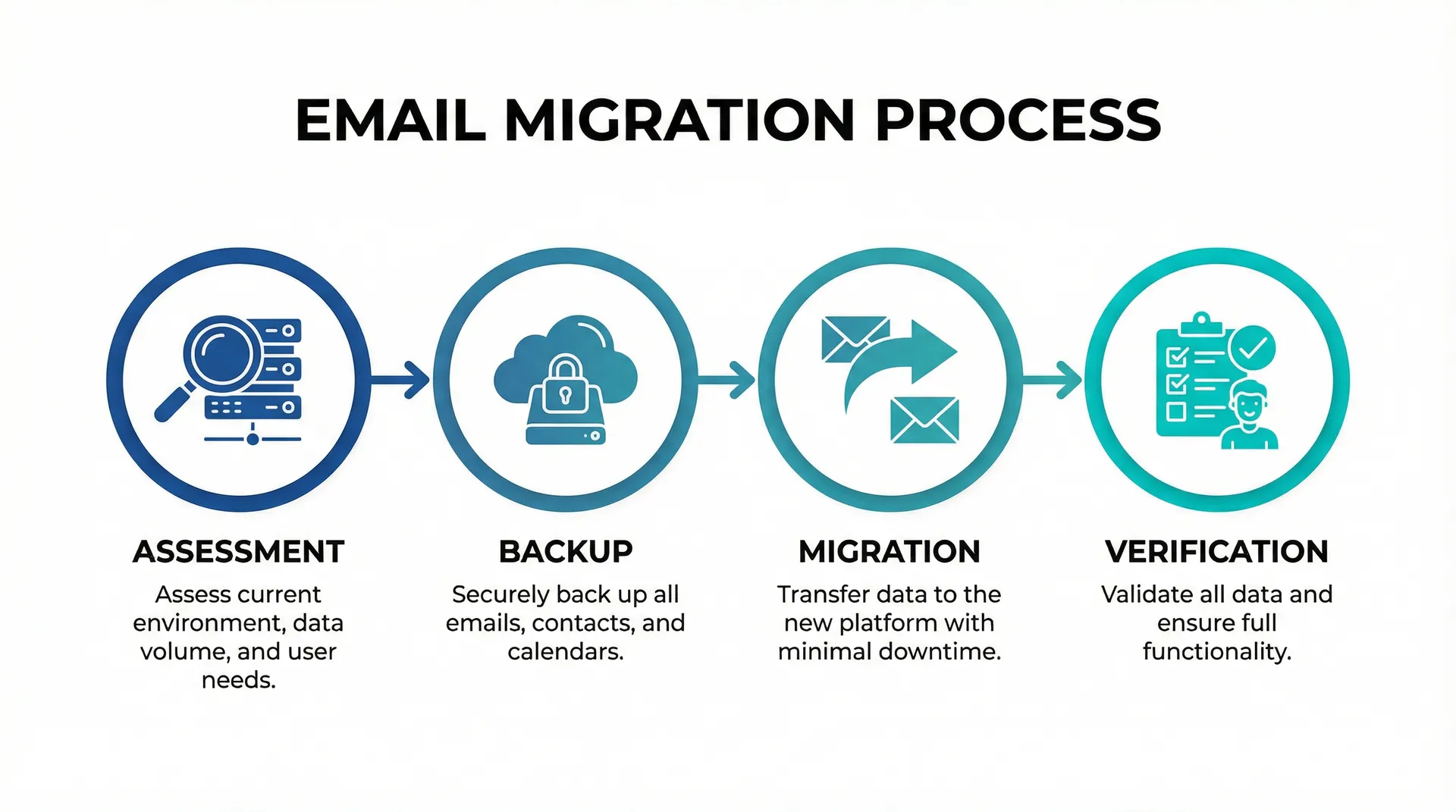
We recognise that every email migration project is unique, with its own set of challenges and requirements. That is why we begin every engagement with a detailed assessment of your current infrastructure and a clear understanding of your goals. This allows us to design a tailored migration plan that minimises downtime and ensures a smooth transition. From verifying domain settings and DNS records to configuring spam filters and setting up mobile device access, we handle every aspect of the process so you can focus on what matters most—running your business or enjoying your digital life without interruption.

What We Do
Email Account Setup and Configuration
Complete email account setup and configuration for all major messaging providers including Outlook, Gmail, Telstra Bigpond, and business email systems with proper IMAP/POP3 settings, security protocols, and multi-device synchronisation.
Email Migration and Transfer
Professional email migration services including complete transfer of emails, contacts, calendars, and folder structures between different messaging platforms with zero data loss and minimal downtime during the transition process.
Outlook Setup and Optimisation
Expert Microsoft Outlook installation, configuration, and optimisation including PST file management, email rules setup, calendar integration, and performance tuning for optimal productivity and reliability.
Gmail Business Integration
Professional Gmail and Google Workspace setup including custom domain configuration, security settings, collaboration tools integration, and seamless synchronisation across all devices and platforms.
Telstra Bigpond Email Support
Specialised Telstra Bigpond email configuration and migration services including account setup, troubleshooting connection issues, and seamless migration to alternative messaging platforms when required.
Multi-Device Email Synchronisation
Complete email synchronisation setup across computers, smartphones, tablets, and other devices ensuring consistent messaging access, folder organisation, and real-time updates across all platforms.
Email Security and Backup
Comprehensive email security implementation including spam filtering, virus protection, encryption setup, and automated backup solutions to protect your messaging communications and ensure data recovery capabilities.
Email Training and Support
Personalised email training and ongoing support including best practices guidance, productivity tips, troubleshooting assistance, and user education to maximise the benefits of your messaging system.
Real World Application
Consider a scenario common to many Gold Coast businesses: A busy real estate agency in Nerang was operating with a mix of personal Gmail accounts and older ISP-provided emails. As the team grew, this fragmented system became a major liability. Staff members struggled to share calendars, important client emails were frequently lost in spam folders, and there was no central control over company data. When a key employee left, the business owner realised they had no way to access that staff member's client correspondence, posing a significant risk to their client relationships.
The agency contacted Bcom for a solution. We proposed a complete migration to a unified Microsoft 365 environment. Our team conducted a comprehensive assessment of their existing data and developed a phased migration strategy to ensure zero downtime during their busy trading hours. We meticulously migrated over 50,000 emails, contacts, and calendar entries from twelve different disparate accounts into a single, professional tenant. We also configured shared calendars for property viewings and established a central "info@" mailbox for general enquiries that the reception team could manage collaboratively.
The transformation was immediate. The team could now schedule meetings seamlessly, access their email securely from any device while on the road, and the business owner regained full control over company data. We also implemented advanced security features to protect against phishing attacks, a common threat in the real estate industry. This project demonstrates how professional email migration is not just a technical task, but a strategic business improvement that enhances efficiency, security, and professionalism.

Benefits of Professional Email Setup & Migration
Choosing professional email setup and migration services provides significant advantages over attempting a DIY transition. The most critical benefit is the assurance of data integrity. Email systems are complex databases; a simple mistake during transfer can result in the permanent loss of years of important correspondence, contacts, or calendar appointments. Our experienced technicians utilise professional-grade migration tools and follow strict verification protocols to ensure that every single item is transferred accurately and securely, preserving your folder structures and read/unread status.
Another major advantage is the minimisation of downtime. For a business, being without email for even a few hours can mean missed opportunities and frustrated clients. We meticulously plan every migration to occur during off-peak hours or in stages that allow your team to continue working without interruption. We handle the complex DNS changes and server propagations behind the scenes, so your transition feels seamless. You simply log in to your new account, and everything is there, ready for you to work.
Security is also a paramount concern. During a migration, data is vulnerable. We employ encrypted transfer methods and ensure that your new email environment is configured with the latest security standards from day one. This includes setting up Multi-Factor Authentication (MFA), configuring SPF, DKIM, and DMARC records to prevent email spoofing, and implementing robust spam filtering. This proactive approach protects your business from cyber threats and ensures your emails actually reach your clients' inboxes instead of their junk folders.
Common Email Issues We Resolve
Synchronisation Failures: One of the most frequent frustrations we resolve is email synchronisation issues. This occurs when emails read or deleted on your phone still appear as unread on your desktop, or when sent items don't sync across devices. This is often due to incorrect server settings (using POP3 instead of IMAP or Exchange). We reconfigure your devices to ensure a unified experience, so your inbox looks exactly the same whether you are checking it from your office in Bundall or a café in Coolangatta.
Delivery Problems and Spam: If your legitimate business emails are constantly landing in your clients' spam folders, or if you are being bombarded by junk mail, your email reputation may be compromised. We analyse your domain's DNS records and implement proper authentication protocols (SPF, DKIM, DMARC) to verify your identity to other mail servers. This not only improves your deliverability rates but also protects your brand from being used in spoofing attacks.
Corrupted Outlook Data Files: For users relying on Microsoft Outlook, corrupted PST or OST files can cause the application to crash, freeze, or fail to open altogether. This can be terrifying if you rely on local archives. Our technicians are skilled in repairing these data files and, more importantly, moving your data to more stable, cloud-based storage solutions that prevent these corruption issues from recurring and provide automatic backup capabilities.
Frequently Asked Questions
I want to move from GoDaddy/cPanel email to Microsoft 365. Can you help?
Yes, this is a very common migration we handle. We can move all your emails, folders, and contacts from your old host to Microsoft 365, ensuring you don't lose any history during the switch.
Will my email be down during the migration?
We plan migrations carefully to minimise downtime. typically, the switch-over happens quickly, and we can often perform the bulk of the data transfer in the background while you continue to work.
Can you set up email on all my staff's phones and computers?
Absolutely. Once the migration is complete, we can assist with configuring Outlook, mobile apps, and webmail access for all your team members, ensuring everyone is connected.
Do you help with setting up email signatures?
Yes, we can help implement professional, consistent email signatures across your organisation, often using tools that allow you to manage them centrally for brand consistency.
Secure Your Business Communications Today
Don't let email issues slow you down. Whether you need a seamless migration to Microsoft 365 or expert troubleshooting for your current setup, Bcom is here to help. Call us now on 07 3041 8993 or book a consultation online to get started.